
Principle Status iX Share
Access
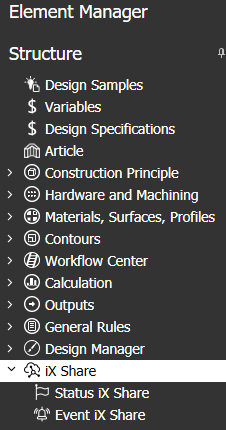
imos Ribbon : Main data > Main data > Element Manager > iX Share
Organizer Organizer > Tab Element Manager > iX Share
General Information
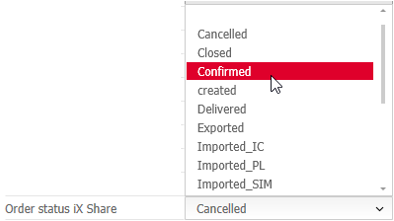
In the principle Status iX Share, you define a status that can be allocated in an order - either when a specific program function happened or when somebody set the Status iX Share manually in the order's Header Data.
Requirements
Status principles can only be created and edited
- by users who have administrator rights and
- when the licence contains "Full version iX".
The node "iX Share" in the Element Manager is not available for users who have less rights, such as iX Plan users.
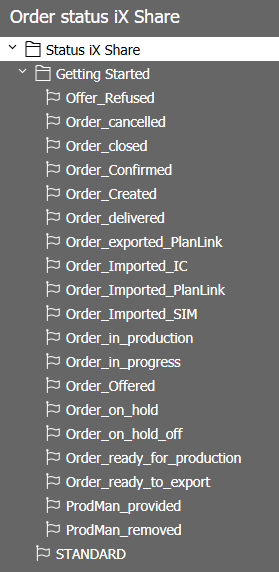
Tip: In Design Catalog Online (DCO), you can download a data package with the following sample principles for Status (and Event).
Options
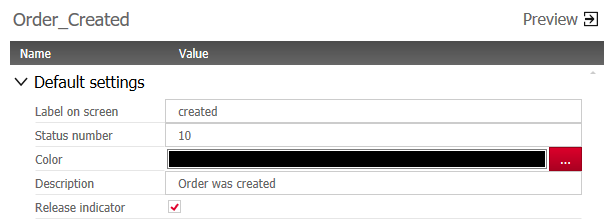
Default settings
| Field | Description |
|---|---|
| Principle name | The principle name is only relevant for the application. It is not displayed in the graphical user interfaces - for this, there is the separate property "Label on screen". This allows you to change the label without deleting and creating the same principle again. |
| Label on screen | The text in the field "Label on screen" can be defined individually; the character limit is 30. In the graphical user interface, the label is used in the fields called "Order Status iX Share". |
| Status number | Assign any whole number that is not assigned yet. |
| Color | To every status, you can assign a color. |
| Description | In the field Description, you can describe the status in more detail; the character limit is 255. |
| Release indicator |
Checkmark this option to activate the Status principle. Only Status principles that have been released/ activated can be applied by the program or by the user. Tip: Remove the checkmark if the principle is not ready to use and it should not be applied. |
Trigger functions
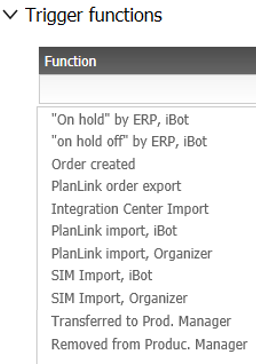
Optionally, you can add one or more program functions with the Plus button in the section "Trigger functions"; a trigger function automatically sets the Order Status iX Share as soon as it is executed. Note:
- The availability of the functions in the dropdown-list is predefined.
- When a function has already been assigned in a Status principle, it cannot be assigned in a different Status principle.
Note: If imos implements additional trigger functions, they will be provided via a program update.
Please contact your local imos sales partner for a translation of the text.
Refer also