
Principle Event iX Share
Access
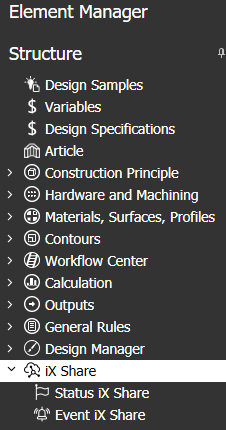
imos Ribbon : Main data > Main data > Element Manager > iX Share
Organizer Organizer > Tab Element Manager > iX Share
General Information
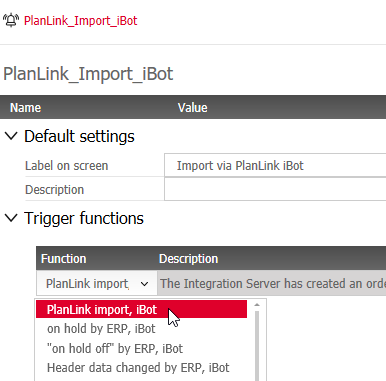
In the principle Event iX Share, you define what event should be logged in the order's History when a specific program function is triggered.
In the example configuration (see image), the label "Import via PlanLink iBot" would be written into the History log as soon as the function "PlanLink Import, iBot" has been triggered.
Prerequisite:
Event principles can only be created and edited
- by users who have administrator rights and
- when the licence contains "Full version iX".
The node "iX Share" in the Element Manager is not available for users who have less rights, such as iX Plan users.
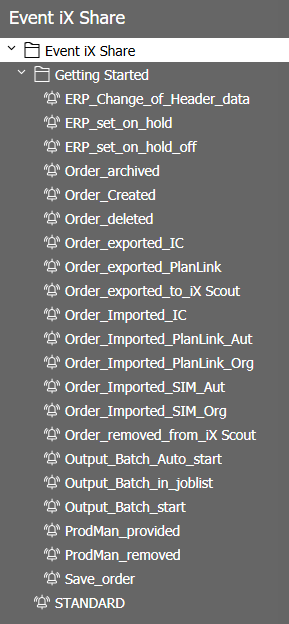
Tip: In Design Catalog Online (DCO), you can download a data package with the following sample principles for Events (and Status).
Options
Default settings
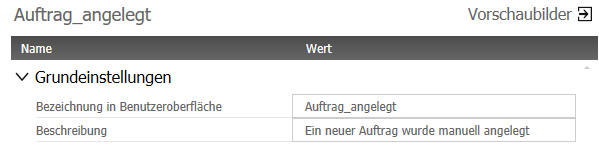
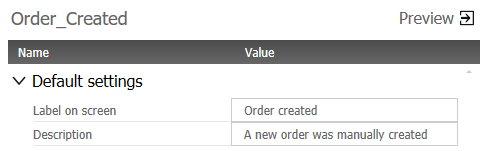
- The principle name (here: "Order_Created") is only relevant for the application. It is not displayed in the graphical user interfaces - for this, there is the separate property "Label on screen". This allows you to change the label retrospectively without deleting and creating the same principle again.
- The text in the field "Label on screen" can be defined individually; the character limit is 30. When a function triggers the event, that event will be logged in the order history table; The "Label" of the event will be displayed in the column "Event".
- In the field Description, you can describe the Event in more detail; the character limit is 255.
Trigger functions
Information on order history can only be written automatically by the program. You cannot add an event in the order history manually.
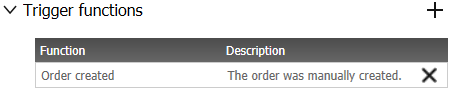
So, an Event principle only makes sense when a "Trigger function" is assigned.
Note:
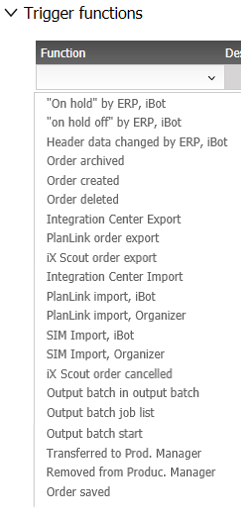
- The availability of the functions in the dropdown-list is predefined.
- Only one trigger function can be assigned per Event principle.
- If a function has already been assigned in an Event principle, it cannot be assigned in another Event principle.
Note: If imos implements additional trigger functions, they will be provided via a program update.
Please contact your local imos sales partner for a translation of the text.
Refer also