
Constructive connector characteristics - Drawers
Access
Ribbon : Main data > Main data > Element Manager > Connections > Connector
General Information
The constructive connector characteristics describe certain features of the connector. For example, you can modify the position of the connector in the article.
Definitions
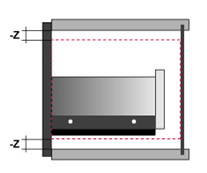
|
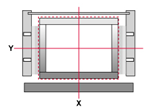
Outside Box The virtual outside box is the space which results from: The carcass inside dimension minus the value for the set safe distances in X, Y and Z. All parts/ connectors must be within the virtual outside box. The drawer front is excluded from this rule. |
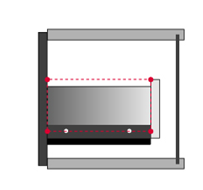
|
Inside box The virtual inside box is a box within the outside box. The parts/ connectors of the drawer are positioned on its corner points. |
The following types of drawers are available:
You can differentiate between the following types of drawer part numbers:
- horizontal installation
- vertikaler Einbau
Manufactured Part
| Preview | Characteristic-Name | Values | Explanation |
|
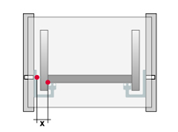
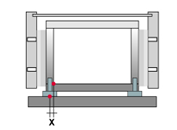
Distance slide/box in X (SL_DR_X) |
Number (editable) |
Distance between the insertion point of the slide and the insertion point of the virtual inside box in X . |
|
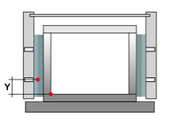
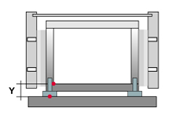
Distance slide/Box in Y (SL_DR_Y) |
Number (editable) |
Distance between the insertion point of the slide and the insertion point of the virtual inside box in Y . If this characteristic is not displayed, then it will automatically be calculated: 0 – Value from the characteristic "Distance Front edge". |
|
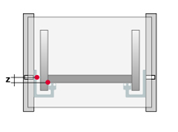
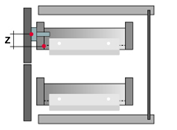
Distance slide/box in Z (SL_DR_Z) |
Number (editable) |
Distance between the insertion point of the slide and the insertion point of the virtual inside box in Z . |
|
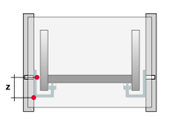
Distance slide bottom (SL_BO) |
Number (editable) |
Distance between the insertion point of the slide and the bottom edge of the slide. |
|
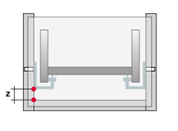
Safe distance bottom edge (SL_SE_BO) |
Number (editable) |
Safe distance between the bottom edge of the slide and the bottom side of the virtual outside box. |
|
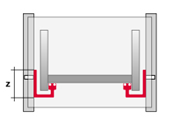
Slide height (SL_H) |
Number (editable) |
The characteristic indicates the height of the slide. |
|
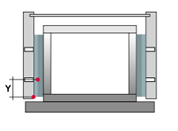
Distance front edge (SL_FR) |
Number (editable) |
Distance between the insertion point of the slide and the front edge of the slide. |
|
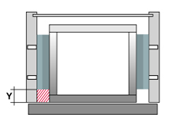
Safe distance front edge (SL_SE_FR) |
Number (editable) |
Safe distance between the slide and the front edge of the virtual outside box. |
|
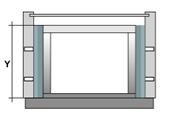
Drawer depth (SL_L) |
Number (editable) |
The characteristic indicates the depth of the drawer. If it is a Quadro drawer runner the adjusted value will be equal to the length of the slide. |
|
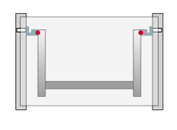
Insertion point slide (SL_DR_REF) |
The insertion point of the slide refers to the drawer. | ||
|
OBEN = Top | ||
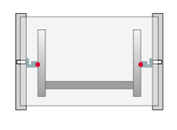
|
MITTE = Center | ||
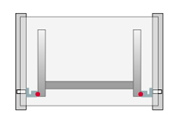
|
UNTEN = Bottom | ||
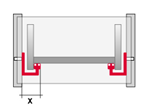
|
Installation width slide (SL_EB) |
Number (editable) |
The characteristic defines the width of the slide. |
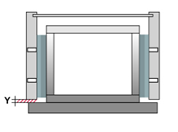
|
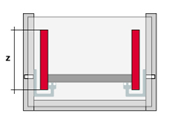
Distance carcase/drawer front (MES) |
Number (editable) |
Distance of the front edge to the filler. |
|
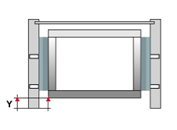
Frame height (previously Drawer height) (DR_H) |
Number (editable) |
Drawer height. |
|
Drawer reveal (editable) |
Number (editable) |
This characteristic moves the inside box including slides to the back with the set values. The value can be stored in the frame, the front, the back or an accessory part. |
| Drawer-connector type (DR_TYP) | Type of drawer connector | ||
|
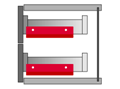
Slide (SL) |
||
|
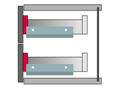
Front piece (FP) |
||
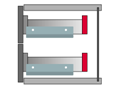
|
Back piece (BP) |
||
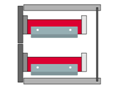
|
Frame (ZARGE) |
||
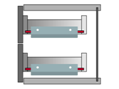
|
Soil (BS) |
||
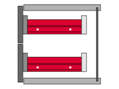
|
SL+Zarge = Slide frame | ||
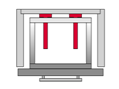
|
BP_FITTING = Back panel fitting (e.g. Face Frame) | ||
|
Distance accessory in X (DR_FIT_X) |
Number (editable) |
Distance of the drawer accessory (e.g. Aluminum front panel, front attachment) to the insertion point of the inside box in X . |
|
Distance accessory in Y (DR_FIT_Y) |
Number (editable) |
Distance of the drawer accessory Distance of the drawer accessory (e.g. Aluminum front panel, front attachment) to the insertion point of the inside box in Y . |
|
Distance accessory in Z (DR_FIT_Z) |
Number (editable) |
Distance of the drawer accessory (e.g. Aluminum front panel, front attachment) to the insertion point of the inside box in Z . |
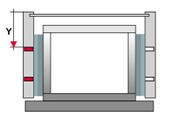
|
Working part back edge (SL_REF_BEHIND) |
Part number |
Many optional part numbers can be entered. Each part number is separated with a comma. With the entered parts the workings are not aligned on the part front edge but on the back edge. |
|
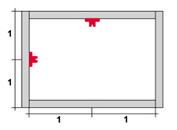
Slide position left/top (SL_DIV_TOP_LEFT) |
Linear Division (editable) |
The characteristic defines position and number of the left or upper slide, within the virtual external box. The positioning takes place via the input of a linear division. By using this characteristic, the division is applied automatically to the opposite side. |
|
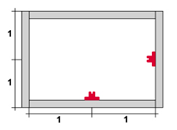
Slide position right/bottom (SL_DIV_BOT_RIGHT) |
Linear Division (editable) |
The characteristic defines position and number of the right or lower slide, within the virtual external box. The positioning takes place via the input of a linear division. By using this characteristic, the division is applied automatically to the opposite side. |

|
Order number (BEST_ANZ) |
Number (editable) |
Order number in the part list; for example with front clips. |
|
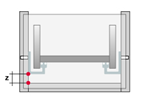
Safe distance to Bottom Shelf (SL_SE_BO_BS) |
Number (editable) |
The safe distance between the bottom edge of the slide to the bottom shelf. If there is no shelf beneath the drawer, the characteristic remain unconsidered |
|
Hide connectors inside scan (SHOW_DIALOG_ FALSE) |
1 = Yes 0 = No |
1 = This connector is hidden in the connector scan. Can be used for all connectors. |

|
Set article (IS_SET) |
1 = Yes 0 = No |
A set article is set as a connector and only effects the part list output. It has no further constructive implication. |
|
Reference to upper edge (DR_FIT_REF_TOP) |
This characteristic can be applied to accessories. The Accessory is aligned to the upper edge of the defined part. | ||
|
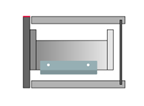
Drawer Front (DR_FR) |
||
|
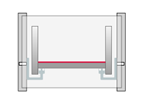
Drawer Bottom (DR_BS) |
||
|
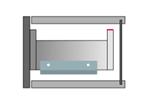
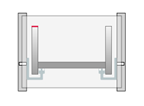
Drawer Box Back (DR_BP) |
||
|
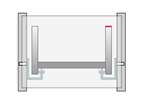
Drawer side left (DR_LS) |
||
|
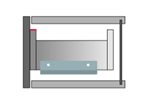
Drawer side right (DR_RS) |
||
|
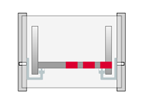
Drawer Box Front (DR_FP) |
||
|
Insert grid in X (DR_FIT_RASTER_X) |
Number (editable) |
This characteristic can be applied to accessories. Multi existing accessory is inserted by using the defined value as offset in X direction. |
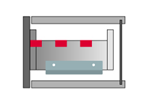
|
Insert grid in Y (DR_FIT_RASTER_Y) |
Number (editable) |
|
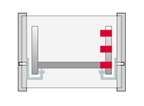
|
Insert grid in Z (DR_FIT_RASTER_Z) |
Number (editable) |
This characteristic can be applied to accessories. Multi existing accessory is inserted by using the defined value as offset in Z direction. |
|
|
Positioning on front in Z (DR_FIT_DIV) |
Linear division or descriptor (editable) |
The accessory connector which contains this characteristic is positioned on the basis of the linear division in relation to the drawer front in z-direction. Reference dimension for the linear division is the height of the front. If the drawer has no front, the accessory will not be inserted! The characteristic can be inserted ADDITIONALLY to the rail. Then the linear division, most of the components from result, is used. The rail requires 4 buffers, regardless of the front height. |
|
|
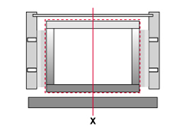
Distance to half Overlay (DR_FIT_DIV_X) |
Number (editable) |
This feature is only valid in conjunction with the feature and only overlay front. Has an accessory that characteristic, it is positioned in the X direction with respect to the half-support at the front. Positive values move the accessories inside. |
|
In width (X) |
||
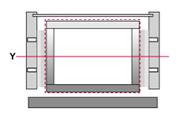
|
In depth (Y) |
||
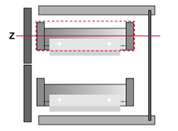
|
In height (Z) |
||
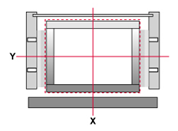
|
In width+depth (XY) |
||
|
|
In width+height (XZ) | ||
|
|
In depth+height (YZ) | ||
|
|
In width+depth+height (XYZ) | ||
|
|
Moves component (DR_MOVES_ COMPONENT) |
Name of the Drawer-connector type (i.e. rail) |
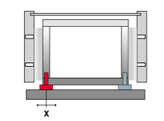
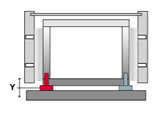
Connectors with the same value applied to the characteristic Drawer-connector type will be moved in addition. The offset is defined by the values of the characteristics Component offset X, Y and Z. The connector has to be a general accessory (no slide, frame,...) |
|
Component offset X (DR_MOVE_ COMPONENT_X) |
Number (editable) |
This characteristic only has a bearing in combination with the characteristic Moves component . There is defined for which kind of connector the offset is used. The component is moved in X direction for the inserted value. |
|
Component offset Y (DR_MOVE_ COMPONENT_Y) |
Number (editable) |
This characteristic only has a bearing in combination with the characteristic Moves component . There is defined for which kind of connector the offset is used. The component is moved in Y direction for the inserted value. |
|
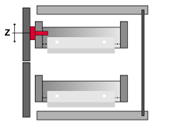
Component offset Z (DR_MOVE_ COMPONENT_Z) |
Number (editable) |
This characteristic only has a bearing in combination with the characteristic Moves component . There is defined for which kind of connector the offset is used. The component is moved in Z direction for the inserted value. |
|
|
Positioning of the (internal) drawer (SL_INNERDRAWER_POSREF) |
Values (from top, from bottom) | In the main settings of the drawer you can now choose whether the DR is to be positioned from the bottom (default) or from above. If the DR is positioned from above, it is placed as far as possible up. About the settings ‘Distance to front panel top’ and ‘bottom’ The positioning can be alternatively controlled by this feature in the rail. |
|
|
Offset at Shelf (SL_OFFSET_SH) |
Number (editable) |
Moves the drawers parts to the top (except fronts) by the value of the characteristic, if a shelf extends from the bottom into the front. Can be combined with the characteristics SL_MINDIST_CS and SL_OFFSET_SH_DIST . |
|
|
Minimum distance from construction shelf (SL_MINDIST_CS) |
Number (editable) |
Only apply together with the characteristic SL_OFFSET_SH ! If the part that projects from the bottom into the front is a bottom shelf, the drawer parts are shifted in either case to the top. If the part that projects from the bottom into the front is a construction shelf, the drawer parts are only shifted to the top, if the distance of the drawer bottom side to the top side of the shelf is bigger than the value of this characteristic. |
|
|
SL_OFFSET_SH_DIST |
Number (editable) |
Only apply together with the characteristic SL_OFFSET_SH ! The value of this characteristic defines how far a shelf is allowed to project from the bottom into the front, before the drawer parts will be moved to the top. |
|
|
Inner drawer positioning (SL_INNERDRAWER_POSREF) |
From top From bottom |
The characteristic controls alternative the settings of the inner drawer positioning in the main settings of the drawer. There you can define whether the drawer should be positioned from the bottom (default) or from the top. The following options of construction are supported for positioning from top.
|
Drawer system
| Preview | Characteristic-Name | Values | Explanation |
|
|
Distance slide/box in X (SL_DR_X) |
Number (editable) |
Distance between the insertion point of the slide and the insertion point of the virtual inside box in X . |
|
|
Distance slide/Box in Y (SL_DR_Y) |
Number (editable) |
Distance between the insertion point of the slide and the insertion point of the virtual inside box in Y . If this characteristic is not displayed, then it will automatically be calculated: 0 – Value from the characteristic "Distance Front edge". |
|
|
Distance slide/box in Z (SL_DR_Z) |
Number (editable) |
Distance between the insertion point of the slide and the insertion point of the virtual inside box in Z . |
|
|
Distance slide bottom (SL_BO) |
Number (editable) |
Distance between the insertion point of the slide and the bottom edge of the slide. |
|
|
Safe distance bottom edge (SL_SE_BO) |
Number (editable) |
Safe distance between the bottom edge of the slide and the bottom side of the virtual outside box. |
|
|
Slide height (SL_H) |
Number (editable) |
The characteristic indicates the height of the slide. |
|
|
Distance front edge (SL_FR) |
Number (editable) |
Distance between the insertion point of the slide and the front edge of the slide. |
|
|
Safe distance front edge (SL_SE_FR) |
Number (editable) |
Safe distance between the slide and the front edge of the virtual outside box. |
|
|
Drawer depth (SL_L) |
Number (editable) |
The characteristic indicates the depth of the drawer. If it is a Quadro drawer runner the adjusted value will be equal to the length of the slide. |
|
Insertion point slide (SL_DR_REF) |
The insertion point of the slide refers to the drawer. | ||
|
|
OBEN = Top | ||
|
|
MITTE = Center | ||
|
|
UNTEN = Bottom | ||
|
|
Slide height (SL_H) |
Number (editable) |
The characteristic indicates the height of the slide. |
|
|
Installation width slide (SL_EB) |
Number (editable) |
The characteristic defines the width of the slide. |
|
|
Distance carcase/drawer front (MES) |
Number (editable) |
Distance of the front edge to the filler. |
|
|
Frame height (previously Drawer height) (DR_H) |
Number (editable) |
Drawer height. |
|
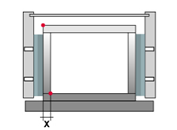
Distance back frame in X (DR_BP_X) |
Number (editable) |
Distance of the back frame to the insertion point of the inside box in X . The characteristic is only read-out for the frame system. |
|
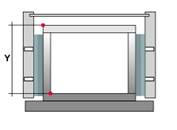
Distance back frame in Y (DR_BP_Y) |
Number (editable) |
Distance of the back frame to the insertion point of the inside box in Y . The characteristic is only read-out for the frame system. |
|
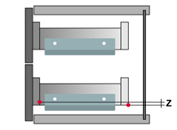
Distance back frame in Z (DR_BP_Z) |
Number (editable) |
Distance of the back frame to the insertion point of the inside box in Z . The characteristic is only read-out for the frame system. |
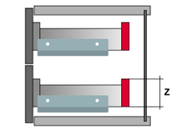
|
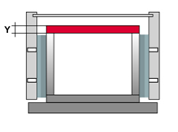
Height back frame (DR_BP_H) |
Number (editable) |
Height of the back frame. The characteristic is only read-out for the frame system. |
|
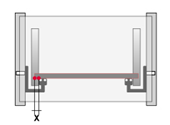
Thickness back frame (DR_BP_THK) |
Number (editable) |
Thickness back frame The characteristic is only read-out for the frame system. |
|
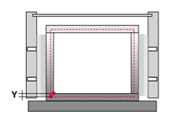
Distance DR Shelf in X (DR_BS_X) |
Number (editable) |
Distance of the drawer shelf to the insertion point of the inside box in X . The characteristic is only read-out for the frame system. |
|
Distance DR shelf in Y (DR_BS_Y) |
Number (editable) |
Distance of the drawer shelf to the insertion point of the inside box in Y . The characteristic is only read-out for the frame system. |
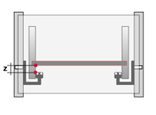
|
Distance DR shelf in Z (DR_BS_Z) |
Number (editable) |
Distance of the drawer shelf to the insertion point of the inside box in Z . The characteristic is only read-out for the frame system. |
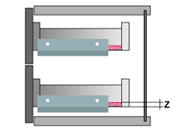
|
Drawer shelf thickness (DR_BS_THK) |
Number (editable) |
Thickness of the drawer shelf. The characteristic is only read-out for the frame system. |
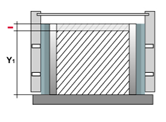
|
Drawer shelf depth 1 (DR_BS_D_SUB_1) |
Number (editable) |
If either the front or the back is a purchase part in the frame system, the value will be subtracted from the depth of the drawer shelf. The value, which is subtracted, is equivalent to the thickness of the purchase part. (Thickness of the front or the back). The default value of the shelf depth is equivalent to the set value in the characteristic „ Slide length “. The attribute can be assigned to the front and back part as well as to any number of accessory parts (connectors that are neither slide, nor front, nor back). All values that are entered in the accessory are added on the existing value (from front, back, slide, drawer). |
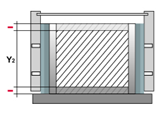
|
Drawer shelf depth 2 (DR_BS_D_SUB_2) |
Number (editable) |
If the front and the back are purchase parts in the frame system, the value will be subtracted from the depth of the drawer shelf. The value, which is subtracted, is equivalent to the sum of the front thickness and back thickness. The default value of the shelf depth is equivalent to the set value in the characteristic „ Slide length “. The characteristic must be stored in the back. |
|
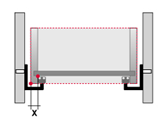
Distance front frame in X (DR_FP_X) |
Number (editable) |
Distance of the front frame to the insertion point of the inside box in X . |
|
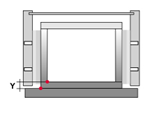
Distance front frame in Y (DR_FP_Y) |
Number (editable) |
Distance of the front frame to the insertion point of the inside box in Y . |
|
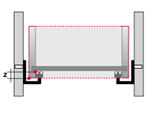
Distance front frame in Z (DR_FP_Z) |
Number (editable) |
Distance of the front frame to the insertion point of the inside box in Z . |
|
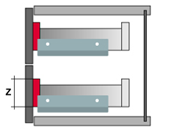
Height front frame (DR_FP_H) |
Number (editable) |
The characteristic indicates the height of the front panel. |
|
|
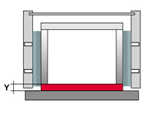
Drawer reveal (DR_INSET) |
Number (editable) |
This characteristic moves the inside box including slides to the back with the set values. The value can be stored in the frame, the front, the back or an accessory part. |
|
Thickness front frame (DR_FP_THK) |
Number (editable) |
The characteristic indicates the thickness of the front frame. |
| Drawer-connector type (DR_TYP) | Type of drawer connector | ||
|
|
Slide (SL) |
||
|
|
Front piece (FP) |
||
|
|
Back piece (BP) |
||
|
|
Frame (ZARGE) |
||
|
|
Soil (BS) |
||
|
|
SL+Zarge = Slide frame | ||
|
|
BP_FITTING = Back panel fitting (e.g. Face Frame) | ||
|
|
Distance accessory in X (DR_FIT_X) |
Number (editable) |
|
|
|
Distance accessory in Y (DR_FIT_Y) |
Number (editable) |
Distance of the drawer accessory Distance of the drawer accessory (e.g. Aluminum front panel, front attachment) to the insertion point of the inside box in Y . |
|
|
Distance accessory in Z (DR_FIT_Z) |
Number (editable) |
Distance of the drawer accessory (e.g. Aluminum front panel, front attachment) to the insertion point of the inside box in Z . |
|
|
Working part back edge (SL_REF_BEHIND) |
Part number |
Many optional part numbers can be entered. Each part number is separated with a comma. With the entered parts the workings are not aligned on the part front edge but on the back edge. |
|
|
Slide position left/top (SL_DIV_TOP_LEFT) |
Linear Division (editable) |
The characteristic defines position and number of the left or upper slide, within the virtual external box. The positioning takes place via the input of a linear division. By using this characteristic, the division is applied automatically to the opposite side. |
|
|
Slide position right/bottom (SL_DIV_BOT_RIGHT) |
Linear Division (editable) |
The characteristic defines position and number of the right or lower slide, within the virtual external box. The positioning takes place via the input of a linear division. By using this characteristic, the division is applied automatically to the opposite side. |
|
|
Order number (BEST_ANZ) |
Number (editable) |
Order number in the part list; for example with front clips. |
|
|
Hide connectors inside scan (SHOW_DIALOG_ FALSE) |
1 = Yes 0 = No |
1 = This connector is hidden in the connector scan. Can be used for all connectors. |
|
|
Set article (IS_SET) |
1 = Yes 0 = No |
A set article is set as a connector and only effects the part list output. It has no further constructive implication. |
|
Reference to upper edge (DR_FIT_REF_TOP) |
This characteristic can be applied to accessories. The Accessory is aligned to the upper edge of the defined part. | ||
|
|
Drawer Front (DR_FR) |
||
|
|
Drawer Bottom (DR_BS) |
||
|
|
Drawer Box Back (DR_BP) |
||
|
|
Drawer side left (DR_LS) |
||
|
|
Drawer side right (DR_RS) |
||
|
|
Drawer Box Front (DR_FP) |
||
|
|
Insert grid in X (DR_FIT_RASTER_X) |
Number (editable) |
This characteristic can be applied to accessories. Multi existing accessory is inserted by using the defined value as offset in X direction. |
|
|
Insert grid in Y (DR_FIT_RASTER_Y) |
Number (editable) |
|
|
|
Insert grid in Z (DR_FIT_RASTER_Z) |
Number (editable) |
This characteristic can be applied to accessories. Multi existing accessory is inserted by using the defined value as offset in Z direction. |
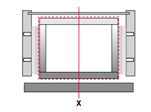
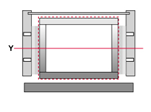
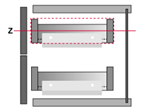
| Position drawer component centered (DR_POS_CENTER) | The characteristic positions the connector central related to the dimension of the inside box. | ||
|
In width (X) | ||
|
In depth (Y) | ||
|
In height (Z) | ||
|
In width+depth (XY) | ||
|
|
In width+height (XZ) | ||
|
|
In depth+height (YZ) | ||
|
|
In width+depth+height (XYZ) | ||
|
|
Moves component (DR_MOVES_ COMPONENT) |
Name of the Drawer-connector type (i.e. rail) |
Connectors with the same value applied to the characteristic Drawer-connector type will be moved in addition. The offset is defined by the values of the characteristics Component offset X, Y and Z. The connector has to be a general accessory (no slide, frame,...) |
|
|
Component offset X (DR_MOVE_ COMPONENT_X) |
Number (editable) |
This characteristic only has a bearing in combination with the characteristic Moves component . There is defined for which kind of connector the offset is used. The component is moved in X direction for the inserted value. |
|
|
Component offset Y (DR_MOVE_ COMPONENT_Y) |
Number (editable) |
This characteristic only has a bearing in combination with the characteristic Moves component . There is defined for which kind of connector the offset is used. The component is moved in Y direction for the inserted value. |
|
|
Component offset Z (DR_MOVE_ COMPONENT_Z) |
Number (editable) |
This characteristic only has a bearing in combination with the characteristic Moves component . There is defined for which kind of connector the offset is used. The component is moved in Z direction for the inserted value. |
|
|
Positioning on front in Z (DR_FIT_DIV) |
Linear division or descriptor (editable) |
The accessory connector which contains this characteristic is positioned on the basis of the linear division in relation to the drawer front in z-direction. Reference dimension for the linear division is the height of the front. If the drawer has no front, the accessory will not be inserted! The characteristic can be inserted ADDITIONALLY to the rail. Then the linear division, most of the components from result, is used. The rail requires 4 buffers, regardless of the front height. |
|
|
Distance to half Overlay (DR_FIT_DIV_X) |
Number (editable) |
This feature is only valid in conjunction with the feature and only overlay front. Has an accessory that characteristic, it is positioned in the X direction with respect to the half-support at the front. Positive values move the accessories inside. |
|
|
Insertion inset (SL_OFFSET_INSET) |
Text (editable) |
Defines the reveal of the slide for inset drawers. Distance between the insertion point of the slide and the bottom edge of the slide. The characteristic has no effect.on onset drawers. |
Purchase drawer
Constructive connector characteristics - Drawers
| Preview | Characteristic-Name | Values | Explanation |
|
|
Distance slide/box in X (SL_DR_X) |
Number (editable) |
Distance between the insertion point of the slide and the insertion point of the virtual inside box in X . |
|
|
Distance slide/Box in Y (SL_DR_Y) |
Number (editable) |
Distance between the insertion point of the slide and the insertion point of the virtual inside box in Y . If this characteristic is not displayed, then it will automatically be calculated: 0 – Value from the characteristic "Distance Front edge". |
|
|
Distance slide/box in Z (SL_DR_Z) |
Number (editable) |
Distance between the insertion point of the slide and the insertion point of the virtual inside box in Z . |
|
|
Distance slide bottom (SL_BO) |
Number (editable) |
Distance between the insertion point of the slide and the bottom edge of the slide. |
|
|
Safe distance bottom edge (SL_SE_BO) |
Number (editable) |
Safe distance between the bottom edge of the slide and the bottom side of the virtual outside box. |
|
|
Distance front edge (SL_FR) |
Number (editable) |
Distance between the insertion point of the slide and the front edge of the slide. |
|
|
Safe distance front edge (SL_SE_FR) |
Number (editable) |
Safe distance between the slide and the front edge of the virtual outside box. |
|
Insertion point slide (SL_DR_REF) |
The insertion point of the slide refers to the drawer. | ||
|
|
OBEN = Top | ||
|
|
MITTE = Center | ||
|
|
UNTEN = Bottom | ||
|
|
Distance carcase/drawer front (MES) |
Number (editable) |
Distance of the front edge to the filler. |
|
|
Frame height (previously Drawer height) (DR_H) |
Number (editable) |
Drawer height. |
|
|
Drawer reveal (editable) |
Number (editable) |
This characteristic moves the inside box including slides to the back with the set values. The value can be stored in the frame, the front, the back or an accessory part. |
| Drawer-connector type (DR_TYP) | Type of drawer connector | ||
|
|
Slide (SL) |
||
|
|
Front piece (FP) |
||
|
|
Back piece (BP) |
||
|
|
Frame (ZARGE) |
||
|
|
Soil (BS) |
||
|
|
SL+Zarge = Slide frame | ||
|
|
BP_FITTING = Back panel fitting (e.g. Face Frame) | ||
|
|
Distance accessory in X (DR_FIT_X) |
Number (editable) |
Distance of the drawer accessory (e.g. Aluminum front panel, front attachment) to the insertion point of the inside box in X . |
|
|
Distance accessory in Y (DR_FIT_Y) |
Number (editable) |
Distance of the drawer accessory Distance of the drawer accessory (e.g. Aluminum front panel, front attachment) to the insertion point of the inside box in Y . |
|
|
Distance accessory in Z (DR_FIT_Z) |
Number (editable) |
Distance of the drawer accessory (e.g. Aluminum front panel, front attachment) to the insertion point of the inside box in Z . |
|
|
Working part back edge (SL_REF_BEHIND) |
Part number |
Many optional part numbers can be entered. Each part number is separated with a comma. With the entered parts the workings are not aligned on the part front edge but on the back edge. |
|
|
Slide position left/top (SL_DIV_TOP_LEFT) |
Linear Division (editable) |
The characteristic defines position and number of the left or upper slide, within the virtual external box. The positioning takes place via the input of a linear division. By using this characteristic, the division is applied automatically to the opposite side. |
|
|
Slide position right/bottom (SL_DIV_BOT_RIGHT) |
Linear Division (editable) |
The characteristic defines position and number of the right or lower slide, within the virtual external box. The positioning takes place via the input of a linear division. By using this characteristic, the division is applied automatically to the opposite side. |
|
|
Order number (BEST_ANZ) |
Number (editable) |
Order number in the part list; for example with front clips. |
|
|
Hide connectors inside scan (SHOW_DIALOG_ FALSE) |
1 = Yes 0 = No |
1 = This connector is hidden in the connector scan. Can be used for all connectors. |
|
|
Set article (IS_SET) |
1 = Yes 0 = No |
A set article is set as a connector and only effects the part list output. It has no further constructive implication. |
|
Reference to upper edge (DR_FIT_REF_TOP) |
This characteristic can be applied to accessories. The Accessory is aligned to the upper edge of the defined part. | ||
|
|
Drawer Front (DR_FR) |
||
|
|
Drawer Bottom (DR_BS) |
||
|
|
Drawer Box Back (DR_BP) |
||
|
|
Drawer side left (DR_LS) |
||
|
|
Drawer side right (DR_RS) |
||
|
|
Drawer Box Front (DR_FP) |
||
|
|
Insert grid in X (DR_FIT_RASTER_X) |
Number (editable) |
This characteristic can be applied to accessories. Multi existing accessory is inserted by using the defined value as offset in X direction. |
|
|
Insert grid in Y (DR_FIT_RASTER_Y) |
Number (editable) |
|
|
|
Insert grid in Z (DR_FIT_RASTER_Z) |
Number (editable) |
This characteristic can be applied to accessories. Multi existing accessory is inserted by using the defined value as offset in Z direction. |
| Position drawer component centered (DR_POS_CENTER) | The characteristic positions the connector central related to the dimension of the inside box. | ||
|
|
In width (X) | ||
|
|
In depth (Y) | ||
|
|
In height (Z) | ||
|
|
In width+depth (XY) | ||
|
|
In width+height (XZ) | ||
|
|
In depth+height (YZ) | ||
|
|
In width+depth+height (XYZ) | ||
|
|
Moves component (DR_MOVES_ COMPONENT) |
Name of the Drawer-connector type (i.e. rail) |
Connectors with the same value applied to the characteristic Drawer-connector type will be moved in addition. The offset is defined by the values of the characteristics Component offset X, Y and Z. The connector has to be a general accessory (no slide, frame,...) |
|
|
Component offset X (DR_MOVE_ COMPONENT_X) |
Number (editable) |
This characteristic only has a bearing in combination with the characteristic Moves component . There is defined for which kind of connector the offset is used. The component is moved in X direction for the inserted value. |
|
|
Component offset Y (DR_MOVE_ COMPONENT_Y) |
Number (editable) |
This characteristic only has a bearing in combination with the characteristic Moves component . There is defined for which kind of connector the offset is used. The component is moved in Y direction for the inserted value. |
|
|
Component offset Z (DR_MOVE_ COMPONENT_Z) |
Number (editable) |
This characteristic only has a bearing in combination with the characteristic Moves component . There is defined for which kind of connector the offset is used. The component is moved in Z direction for the inserted value. |
Open
Electromechanical openers
| Preview | Characteristic-Name | Values | Explanation |
| Servo part (DR_SERVO_TYP) | The entered value identifies the component as an ejector unit, carrier profile, etc. The respective value determines the installation rules for the component. | ||
|
|
Ejector (DR_SERVO_AUSWERFER) |
||
|
|
Carrier section (DR_SERVO_TP) |
||
|
|
Carrier section top holder (DR_SERVO_TPAO) |
||
|
|
Carrier section bottom holder (DR_SERVO_TPAU) |
||
|
|
Carrier section left holder (DR_SERVO_TPAL) |
||
|
|
Carrier section right holder (DR_SERVO_TPAR) |
||
|
|
Carrier section back holder (DR_SERVO_TPAH) |
||
|
|
Top clip (DR_SERVO_WINKEL_O) |
||
|
|
Bottom clip (DR_SERVO_WINKEL_U) |
||
|
Carrier section direction (DR_SERVO_TP_DIR) |
|||
|
|
Vertical carrier section (DR_SERVO_TP_DIR_V) |
The carrier section runs bottom-up. The next shelf/ rail bounds the inner box from the top and the bottom. |
|
|
|
Horizontal carrier section (DR_SERVO_TP_DIR_H) |
The profile runs from the bottom to the top through the clear cuboid of the zone within which the drawer is inserted. The next side panel/ partition bounds the inner box from the left and the right side. |
|
|
|
Carrier section shortage (DR_SERVO_ TPSUB_STR) |
Number (editable) |
It's possible to trim the carrier section on the left/ right side alternatively at the bottom/ top. The inserted value defines the trim. |
DR
Stretchable drawer parts
| Preview | Characteristic-Name | Values | Explanation |
|
|
SPP Path (DR_MVK_PATH) |
Box front (along the front of the virtual box) |
The value of the characteristic defines the path of the stretchable connector along one of the sides respectively the center of the virtual internal box. Optionally the characteristic „ Geometry DWG “ or the characteristic „ Name of the cross-section geometry principle “ defines the section. |
|
|
Box rear (along the back of the virtual box) |
||
|
|
Box right (along the right side of the virtual box) |
||
|
|
Box left (along the left side of the virtual box) |
||
|
|
Box centered (center along the virtual box from front to back) |
||
|
|
Box centered crosswise center along the virtual box from left to right) |
||
|
|
SPP front cut (DR_MVK_CUT_START) |
Text (editable) |
Dimension by which the SPP is shortened at the start of its path. |
|
|
SPP end cut (DR_MVK_CUT_END) |
Text (editable) |
Dimension by which the SPP is shortened at the end of its path. |
|
|
SPP inset (DR_MVK_INSET) |
Text (editable) |
Dimension by which the SPP is engaged in the inner box. |
|
|
SPP offset (DR_MVK_OFFSET) |
Text (editable) |
Dimension by which die SPP is engaged in the height. |
Close
Lock system
| Preview | Characteristic-Name | Values | Explanation |
|
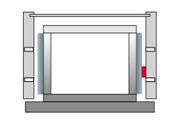
Quantity of locking bars (LS_LBAR_NUM) |
1 |
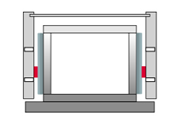
The characteristic indicates the quantity of locking bars. One or two bars can be inserted. The characteristic is not in use anymore! Sole criteria for the construction of a locking bar is the existing of a lock connection on the corresponding side. |
|
2 | ||
|
Thickness locking bar (LS_LBAR_THK) |
Number (editable) |
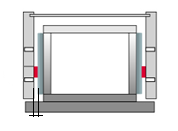
The characteristic describes the thickness of the locking bar in x-direction and has an influence on the thickness of the left locking bar. The same section is used for the left side as for the right side and imos moves the display of the rod by the entered value in the direction of the cabinet center. |
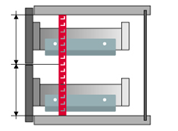
|
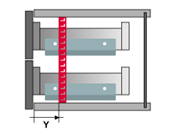
Quantity height units (LS_LBAR_UNITS) |
Number (editable) |
The characteristic defines the quantity of the height units per locking bar. |
|
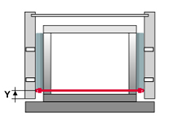
lock bar reveal in Y (LS_LBAR_Y) |
Number (editable) |
The characteristic defines the reveal of the locking bar in the carcass. |
|
Espagnolette reveal in Y (LS_ROD_Y) |
Number (editable) |
Espagnolette reveal from the insertion point of the lock in Y. |
|
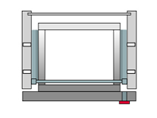
Locking system type (LS_TYP) |
The connector type is defined in the characteristic locking system type. | ||
|
LFRONT = Lock cylinder, key plug, turning handle | ||
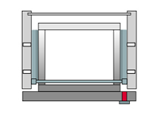
|
LOCK = lock | ||
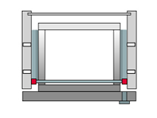
|
LACT_L = Door latch left LACT_R = Door latch right |
||
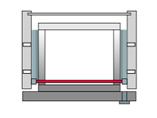
|
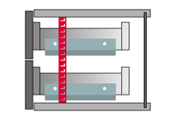
ROD = Espagnolette | ||
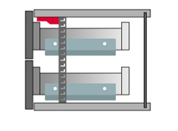
|
LCONN_L = connection left LCONN_R = connection right |
||
|
LBAR = Locking bar | ||
|
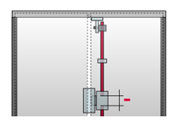
Espagnolette reduction middle (LS_LOCK_ROD_SUB) |
Number (editable) |
The characteristic indicates how the espagnolette should be shortened in the center (in the section of the lock). Can be left out with locks without rods. |
|
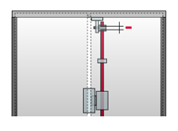
Espagnolette reduction Door latch (LS_LACT_ROD_SUB) |
Number (editable) |
Shortening the espagnolette on the lock latch. |