
Construct an Article Designer with a detailed article preview
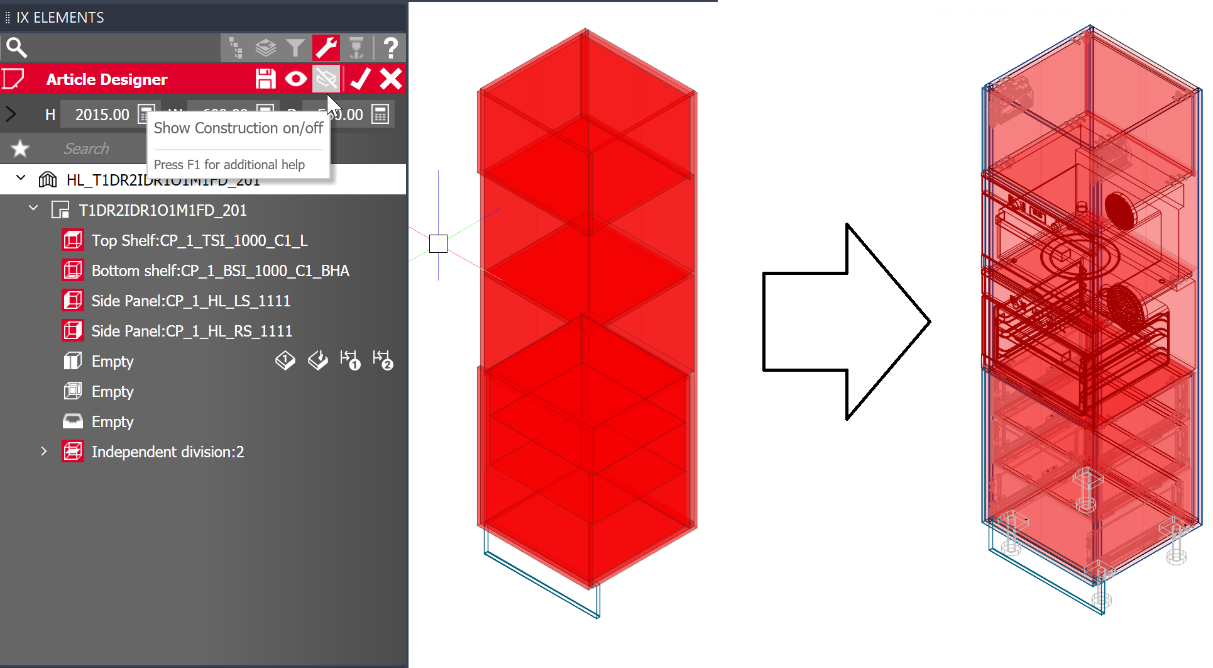
By default, the Article Designer works with a simplified article visualization, which ensures a fast response time when designing. Design parameters, connectors and machinings are left out.
Previously, to be able to check the actual result of an Article Designer construction, you had to exit the Article Designer Parametrics mode and thus rebuild the full article in the drawing area. The new option "Show construction" allows a detailed preview of the construction in the drawing area without having to leave the Parametrics mode. As soon as you turn the option on, the article will be completely calculated and rebuilt every time you make a modification.
The button for switching on/off this "real-time construction" is located in the toolbar of the Article Designer Parametrics tab.
Each modification may take longer due to the additional computational effort, but it offers the advantage of being able to directly control how certain settings affect the construction and parts. For example:
- Effect on C-construction
- Check Design Parameters
- Control connectors (Are there collisions? Is the quantity correct?)
- Positioning of shelves on lineboring
- Display sub-articles and purchased parts
- Measure distances by selecting points of the "real" parts (e.g. 'Snap to Wall')
- Animation of drawers, doors and flaps
Note: The level of detail in the preview depends on the Visualization Level you set.