Combine article to a plan position/article during SIM order import
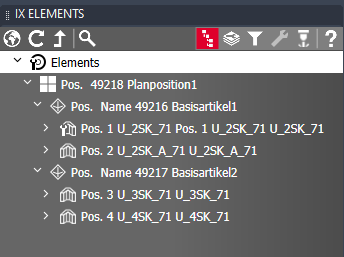
Even during the SIM order import, elements can be automatically combined in a parent article as well as a plan position.
In this way, the necessary drawing data can be generated in an automated process without the need for manual intervention.
Two PVarString variables are used for this purpose:
| PVarString variable | Description |
| ___MERGEARTICLE |
All articles that have the same value in the variable ___ MERGEARTICLE are combined in one article. The name of the new article corresponds to the variable value. |
| ___PLANPOS |
All articles that have the same value in the variable ___ PLANPOS are combined in one plan position. The name of the new plan position corresponds to the variable value. |
Example XML:
<?xml version="1.0" encoding="utf-8" ?>
<XML Type="ListBuilder">
  <Order No="100000051" DispDate="" Basket="100000051">
    <Head></Head>
      <CONTACT_INFO></CONTACT_INFO>
      <BuilderList>
      <Set LineNo="1">
        <Pname>U_2SK_71</Pname>
        <Count>1</Count>
        <PVarString>|___MERGEARTICLE:=Basisartikel1|

        ___PLANPOS:=Planposition1</PVarString>
       </Set>
      <Set LineNo="2">
        <Pname>U_2SK_71</Pname>
        <Count>1</Count>
        <PVarString>|___MERGEARTICLE:=Basisartikel1|

        ___PLANPOS:=Planposition1</PVarString>
      </Set>
      <Set LineNo="3">
        <Pname>U_2SK_71</Pname>
        <Count>1</Count>
        <PVarString>|___MERGEARTICLE:=Basisartikel2|

        ___PLANPOS:=Planposition1</PVarString>
      </Set>
      <Set LineNo="4">
        <Pname>U_2SK_71</Pname>
        <Count>1</Count>
        <PVarString>|___MERGEARTICLE:=Basisartikel2|

        ___PLANPOS:=Planposition1</PVarString>
      </Set>
    </BuilderList>
  </Order>
</XML>
Result: