
Assign SQL views to Process data transfer principles
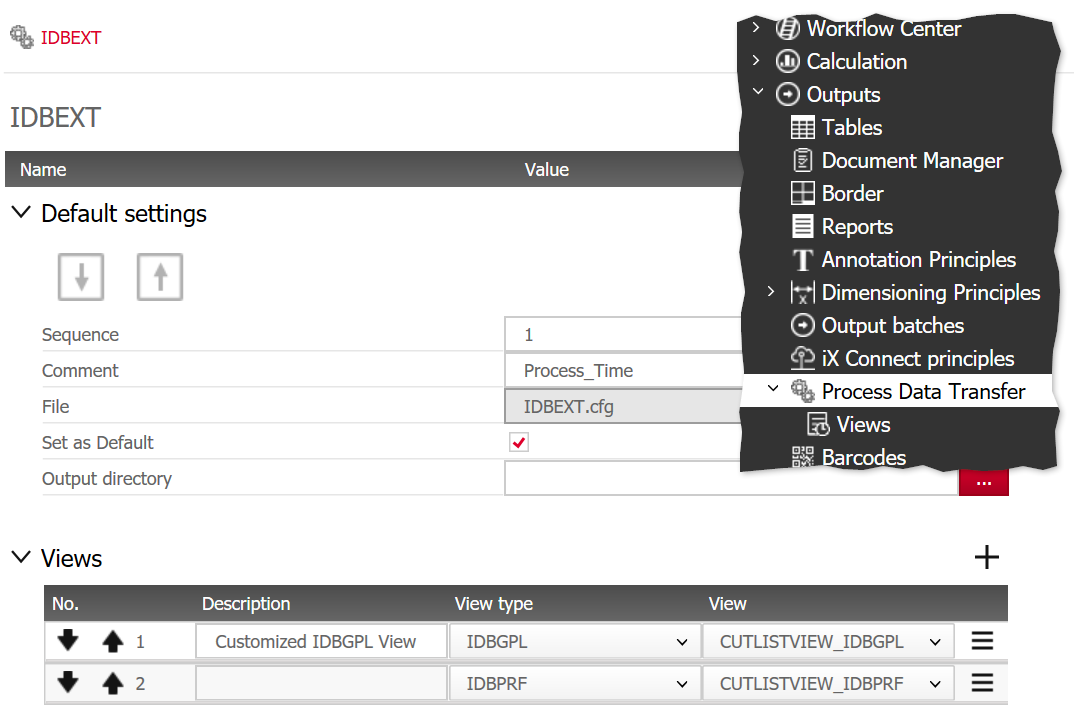
The assignment of SQL view principles to a Process data transfer now takes place in the new Views section of the Process data transfer principle.
Note: A View principle for which the switch Set as default is checked is ignored if Views are assigned in the applied Process data transfer principle. If there is no assignment in the table column View type, the default View principle is used.
Procedure:
For each SQL view to be assigned to a Process data transfer:
- In the section Views, click on Add row.
- For each new row:
- Enter a Description.
- Select a View type from the selection box.
- Select a View principle from the selection box that corresponds to the view type.