
Single parts - Partition
Access
Ribbon : Main data > Main data > Element Manager > Construction Principle > Single Parts
Organizer > Tab Element Manager > Construction principles > Single parts
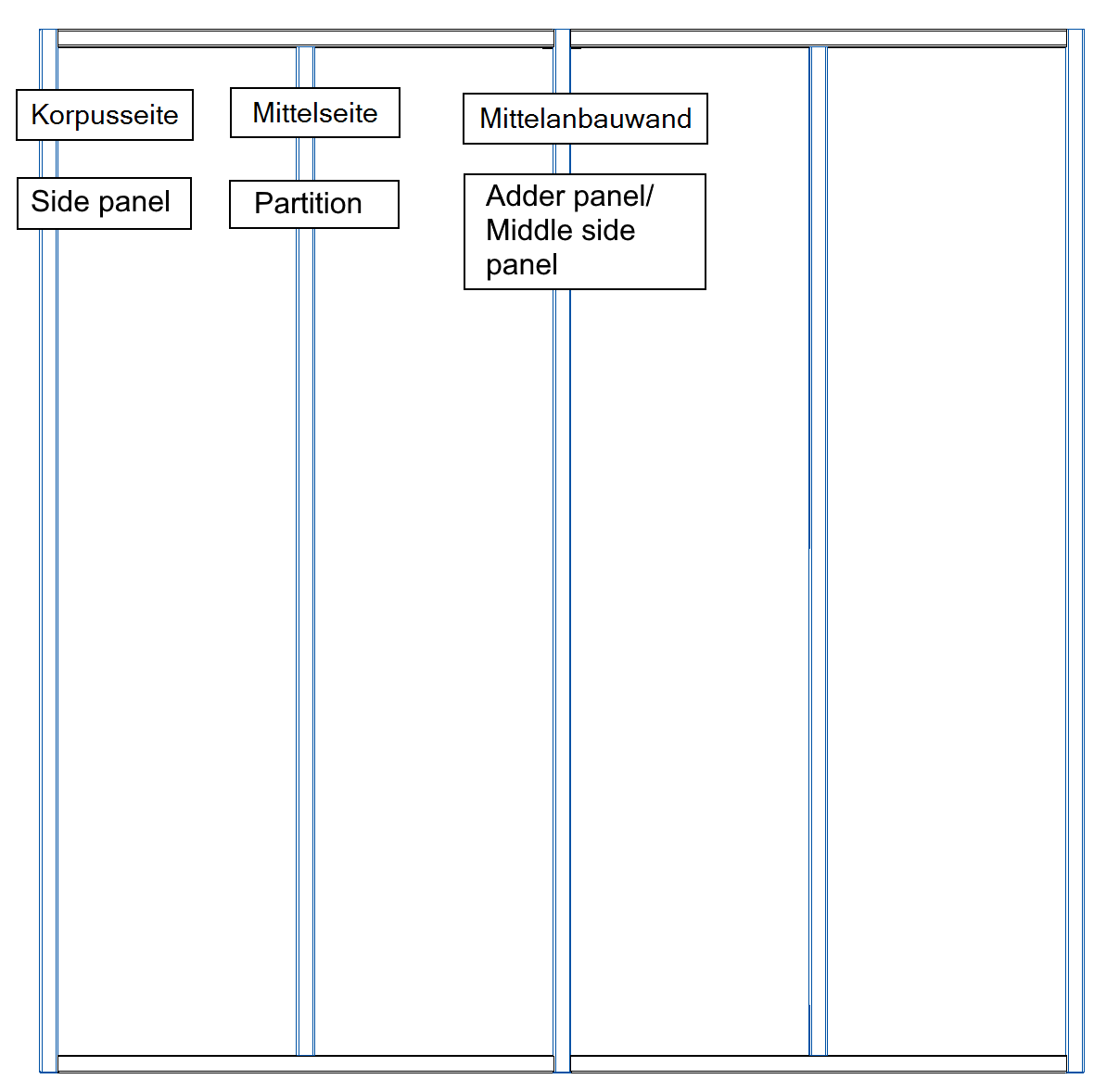
- Partition:
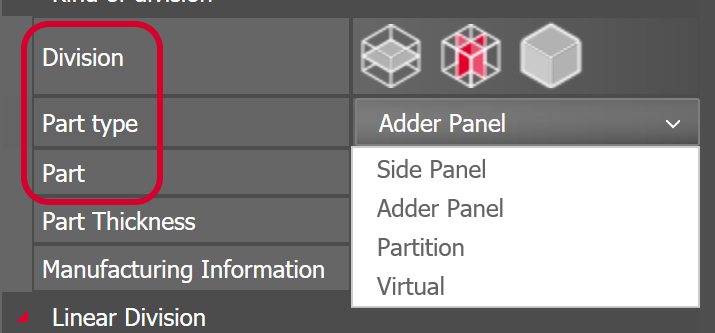
- You define a partition using the 'Single Parts – Partition' principle. In the Article Designer, you can assign this principle to a part if it has 'Division=along the width/depth' and 'Part Type=Partition' set.
- A partition is typically placed between a top shelf and a bottom shelf.
- A partition passes its connection situation on to the top and bottom shelf.
- You CANNOT define lineboring in a partition.
- A partition is included in the gap calculation for fronts. The calculation uses the center of the part edge.
- Adder Panel (or 'middle side panel'):
- You define an adder panel using the 'Single Parts – Side Panel' principle. In the Article Designer, you can assign this principle to a part if it has 'Division=along the width/depth' and 'Part Type=Adder Panel' set.
- An adder panel is typically placed between two top shelves and two bottom shelves.
- The shelves pass their connection situations on to the adder panel.
- You can define lineboring in an adder panel.
- An adder panel is included in the gap calculation for fronts. The calculation uses the center of the part edge. So the calculation does NOT handle adder panels and side panels the same way.
Options
Default settings
| Part Definition | Via a click on the button behind the entry you will switch to the level of Part Definitions. The dropdown box contains part definitions you used at last. |
| Part thickness | Shows the Z dimension of the current Part Definition. |
| Description text | Editable text field. The inserted text only acts as a description of the construction principle. |
| Part Info | Editable text field. The inserted text can be displayed in the part lists. |
Construction
| Offset left | The inserted value creates a protrusion of the partition to the bottom shelf. A negative value results an inset of the side. |
| Offset right | The inserted value creates a protrusion of the partition to the top shelf. A negative value results an inset of the side. |
| Offset front | The inserted value creates an offset of the panel to the front. A negative value results an inset of the side. |
| Offset back | The inserted value creates an offset of the panel backward. A negative value results an inset of the side. |
| Groove construction | With a click on the button next to the entry you change into the level of the groove constructions. The dropdown box contains the last used principles. |
| Orientation frontal edge |
Relative Base Position on both sides If this option has been selected, the front edge of the partition will be aligned diagonally to the shelves. The function depends on the dimensions of the zone. Relative Base Position orthogonal on any side If this option has been selected, you can align the front edge of the partition to one side (short side or long side). |
| Front edge orientation at |
Is only activated if the orientation of the frontal edge is set to Relative Base Position orthogonal on any side . Defines whether the front edge of the partition is flush with the short (top) or long side (bottom). |
| Front edge orthogonal to |
Is only activated if the orientation of the frontal edge is set to Relative Base Position orthogonal on any side . Defines whether the front edge of the partition is at right-angled with the short or long side. |
| Orientation back edge |
Relative Base Position on both sides
If this option has been selected, the back of the partition will be aligned diagonally to the shelves. The function depends on the dimensions of the zone. Relative Base Position orthogonal on any side If this option has been selected, you can align the back of the shelf to one side (short side or long side). |
| Back edge orientation at |
Is only activated if the orientation of the back edge is set to Relative Base Position orthogonal on any side . Defines whether the front edge of the partition is flush with the short (top) or long side (bottom). |
| Back edge orthogonal to |
Is only activated if the orientation of the back edge is set to Relative Base Position orthogonal on any side . The back edge of the shelf is at right-angled with the selected side. |
| Mirror surface | If the function is activated the outside surface will be mirrored inward and vice versa. |

Connector
|
Only one connection situation for all edges |
If this function is activated the same connection situation will be used for all edges. If the function is deactivated you can a different connection situations to each edge. |
| Below |
Setting is only displayed when the function Only one Connection Situation for all edges is not enabled. Via a click on this function you will switch to the level of the connection situations. The dropdown box contains the last used principles. |
| Top |
Setting is only displayed when the function Only one Connection Situation for all edges is not enabled. Via a click on this function you will switch to the level of the connection situations. The dropdown box contains the last used principles. |