
Cut faceplates in part definitions
Access
Element Manager > Parts > Part Definition > Part Editor > Machining tab
Element Manager > Parts > Stretchable Purchased Parts > Part Editor > Machining tab
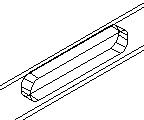
Options
| Orientation |
Defines the orientation of the cut faceplate. The cut faceplate can have the following orientations:
For better visualization, the selected orientation scheme is displayed in the adjacent graphic for each chosen orientation. Only a universal operation can be rotated around three axes. The input fields are enabled once the UNI orientation is selected. |
| Orientation X |
Rotation angle of the cut faceplate around X.
Depending on the selected orientation, the value is either predefined or can be freely chosen. |
| Orientation Y |
Rotation angle of the cut faceplate around Y.
Depending on the selected orientation, the value is either predefined or can be freely chosen. |
| Orientation Z |
Rotation angle of the cut faceplate around Z.
Depending on the selected orientation, the value is either predefined or can be freely chosen. |

| Linear Division |
The position of the cut faceplate can either be defined with fixed values for the start points in X, Y and Z or with a linear division. If the checkbox 'Linear Division' is ticked, the X, Y and Z values can be defined using descriptors respectively. Click the three-dot button to go to the Descriptors. |
| Starting Point X |
X-coordinate of the insertion point. Can also be defined by descriptors. |
| Starting Point Y |
Y-coordinate of the insertion point. Can also be defined by descriptors. |
| Starting Point z |
Z- coordinate of the insertion point. The insertion point depends on the orientation of the drilling. Can also be defined by descriptors. |
| Length (x) |
Length of the cut faceplate in mm. Can be defined as variable number.
|
| Width (y) |
Width of the cut faceplate in mm. Can be defined as variable number. |
| Depth (z) |
Depth of the cut faceplate in mm. Can be defined as variable number. |
| Corner radius |
The corners of the cut faceplate are rounded off by the entered value entered. The entry is shown in mm. Can be defined as variable number. |
| Rabbet offset |
If the faceplate pocket is to be inserted into a door with a rabbet, you can enter the rabbet width with this parameter and therefore move the faceplate pocket by the value entered. Can be defined as variable number.
The preview does NOT show the offset. |
| Edge Profile | You can select a profile and assign it to the cut faceplate. Click the three-dot button to go to the 'Profiles'. |
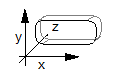
| Technology Data | The technology data can be used to define the tool used for machining. |
| Tool |
Enter the tool name of the tool used.
CAMMAX tools cannot be used here. |
| Feed rate XY | Machining feed in m/min |
| Feed rate Z | Feed rate for the start point of the routing in Z-direction. |
| Speed | Speed of the tool in U/min |
| Infeed | Infeed in mm |