
Multitenancy (Multi-Client)*
If multiple users are working on the same database, the Multitenancy feature allows an administrator to limit the visibility of orders, so that users can only access orders that were created by members, who have the same group permission as themselves.
To do so, the admin has to clear the checkbox Show all orders (not only group related) in the 'Visibility' node of relevant 'Group Permission' principles. By default, the checkbox is ticked in the STANDARD Group Permission that is typically assigned to the administrator.
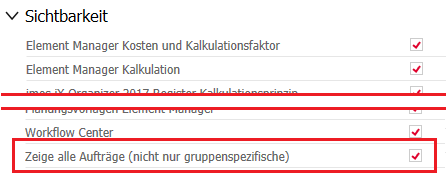
In general, the access to orders depends on the option mentioned above and the User Right that is assigned to a user. For example, a Super Main User is allowed to edit, save and export other users' orders, but when the admin disables "Show all orders" in his Group Permission he can only see and select orders that are relevant to him as they belong to users of his own User Group.
Each User Group must create their own project folders where they can save and access their orders.
- [Root node]
- Shop_Munich <-- created by a user who belongs to the User Group "Shop_Munich"
- Order01
- Order02
- Shop_Berlin <-- created by a user who belongs to the User Group "Shop_Berlin"
- Order03
- Order04
- Shop_Hamburg <-- created by a user who belongs to the User Group "Shop_Hamburg"
- Order05
- Order06
- Shop_Munich <-- created by a user who belongs to the User Group "Shop_Munich"
Via drag-and-drop, the administrator moves existing orders, that are located in a folder hidden to the eye of other users, to a corresponding user group's folder.
If the admin changes the owner to be a user of another User Group, he has to move the order to folder of that user's Group as well.
Note: The admin cannot create the User Groups' folders himself and change the folder owner afterward - the users will not have access to these folders.
Do not save the orders in the root node, if you do not have admin rights - you cannot edit or export these orders otherwise. So make sure that the root node is not selected when saving an order.
*) This function is not included in the basic program version.
Oct 2019 |imos iX 2019
#01140