
iX CAM Functions
Access
Organizer : Element Manager > Workflow Center
Ribbon : Element Manager > Workflow Center
General Information
To define parameters in the Wirkflow Center depending on the context instead of fix values, you can use functions in multiple setting text boxes.
A function always starts with a function call, e.g. tab, and it is enclosed by angle brackets; the function parameters are enclosed by round brackets and their syntax differs depending on the function used (see the 'Function Overview' chapter). In the functions you can make use of global CAM variables.
Example 1: Possible formulas for the infeed in the depth for pockets
<tab(%DE,%DE,5,%DE/2,10,%DE/3)>
Description
%DE = Depth from the machining
%DE,5 = until a depth of 5 mm the depth of the machining will be fed (%DE)
%DE/2,10 = until a depth of 10 mm the depth of the machining will be fed two times (%DE/2)
%DE/3 = over 10 mm the depth of the machining will be fed three times (%DE/3)
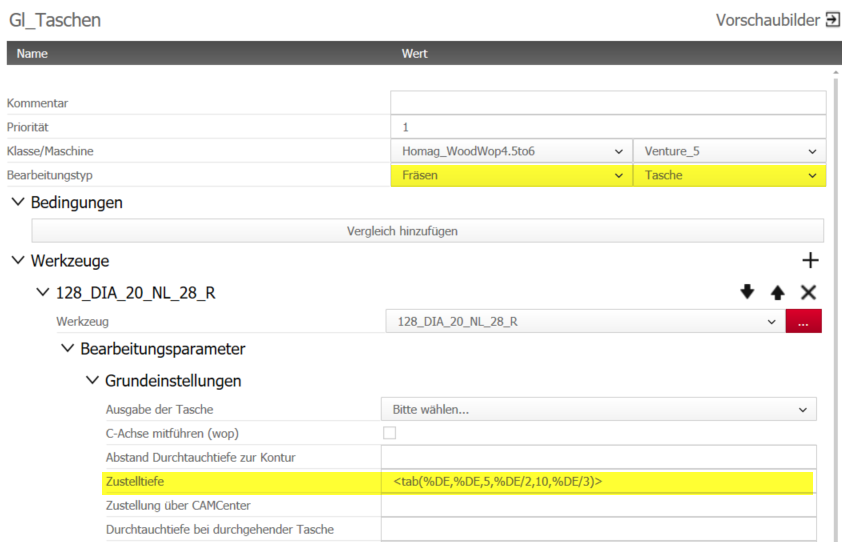
Possible formulas for the infeed in the depth for pockets with contour train 1 (converted into contour train).
Insert function for infeed via CAMCenter!
<tab(%DE,1:1,(19+2),1:1:1,(25+2),1:1:1:1)>
Description
(19+2) =part thickness is 19 mm +2 mm, if there is an entry for 'Extra through depth for through pocket' (use entered value)
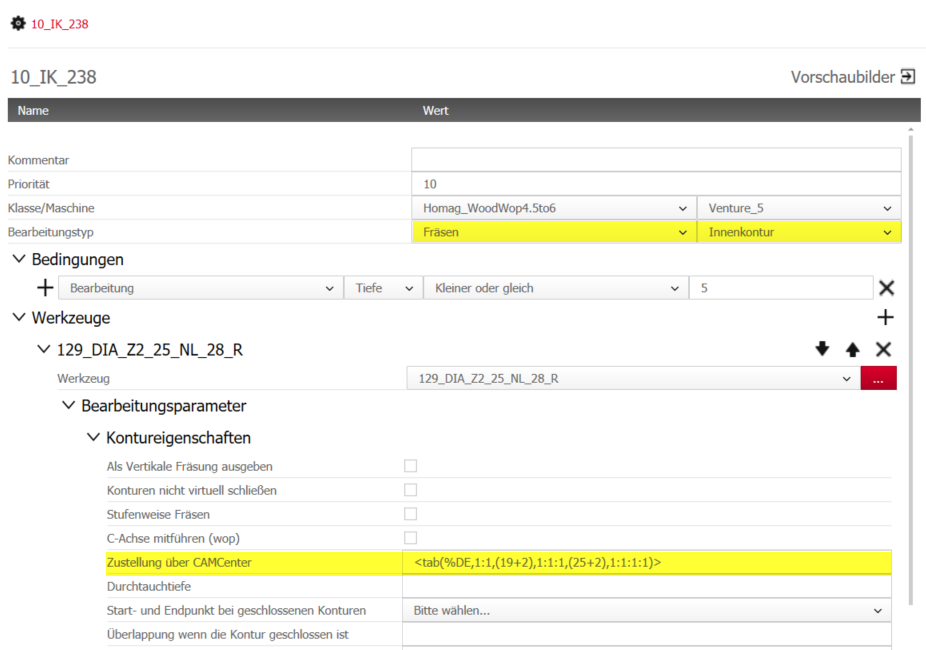
Functions
| Function | Description |
|---|---|
| And |
Returns 1 (true) if all the given parameters are 1.
I.e. <And(0,0)> = 0 <And(1,1)> = 1 <And(1,0)> = 0 <And(1,1,0)> = 0 <And(1,1,1)> = 1 |
| Bigger |
Returns 1 (true) if the double value of Value1 is bigger than the double value of Value2. <Bigger(Value1,Value2)> I.e. <Bigger(7,7)> = 0 <Bigger(7,8)> = 0 <Bigger(7.1,7)> = 1 |
| BiggerE |
Returns 1 (true) if the double value of Value1 is bigger or equal the double value of Value2. <BiggerE(Value1,Value2 )> I.e. <BiggerE(7,7)> = 1 <BiggerE(7,8)> = 0 <BiggerE(7.1,7)> = 1 |
| Calc | Returns the result of the given mathematical calculation. I.e. <Calc((12/4)-1)> = 2 |
| Equal |
Returns 1 (true) if the double value of Value1 is equal to the double value of Value2. <Equal(Value1,Value2 )> I.e. <Equal(7,7)> = 1 <Equal(7,8)> = 0 <Equal(7.1,7)> = 0 |
| EqualS |
Returns 1 (true) if the string value of Value1 is equal (case insensitive) to the string value of Value2. <EqualS(Value1,Value2)> I.e. <EqualS(a,a)> = 1 <EqualS(a,A)> = 1 <EqualS(a,ab)> = 0 <EqualS(HEllO,Hello)> = 1 |
| GetEdgeName |
Returns the name of the requested edge ordinal number.
I.e. <GetEdgeName(3)> = ABS_2 |
| GetProgramEdgeName |
Returns the name of the requested edge ordinal number seen from the program's point of view.
I.e. <GetProgramEdgeName(3)> = PVC_1 |
| GetOperationCount |
Returns the count (amount) of the program's operations with the given type and, optionally, with the given workflow's position's name
I.e.
<GetOperationCount(drill)> = 21 |
| If |
Checks the Condition: if it is 1 (true), returns the True part, otherwise the False part. <If( Condition, True part, False part)> I.e. <If(0,A,B)> = B <If(1,A,B)> = A <If(0,A)> = (empty string) <If(1,A)> = A |
| Not |
Checks the Condition: if it is 1 (true), returns 0 (false), otherwise 1 (true). <Not( Condition )> I.e. <Not(0)> = 1 <Not(1)> = 0 |
| Or |
Returns 1 (true) if at least one of the given parameters is 1. <Or( Condition1, Condition2, ..., ConditionN)> I.e. <Or(0,0)> = 0 <Or(1,1)> = 1 <Or(1,0)> = 1 <Or(1,1,0)> = 1 <Or(1,1,1)> = 1 |
| Smaller |
Returns 1 (true) if the double value of Value1 is smaller than the double value of Value2. <Smaller(Value1,Value2)> I.e. <Smaller(7,7)> = 0 <Smaller(7,8)> = 1 <Smaller(7.1,7)> = 0 |
| SmallerE |
Returns 1 (true) if the double value of Value1 is smaller or equal than the double value of Value2. <SmallerE(Value1,Value2)> I.e. <SmallerE(7,7)> = 0 <SmallerE(7,8)> = 1 <SmallerE(7.1,7)> = 0 |
| Tab |
Returns a parameter according to the given value looked inside the given intervals.
I.e. <Tab(6,1,4,1:1,10,n*3mm:1)> = 1:1 |
| Stab |
Returns a parameter according to the given string searched inside the given values ignoring the case ( ThisText = THIStext ).
I.e. <STab(MyString,1,TheirString,4,YourString,10,MYstring,100)> = 10 |