
Outlets
It is now possible to create outlets to be able to plan furniture perfectly taking into consideration water and electricity connections.
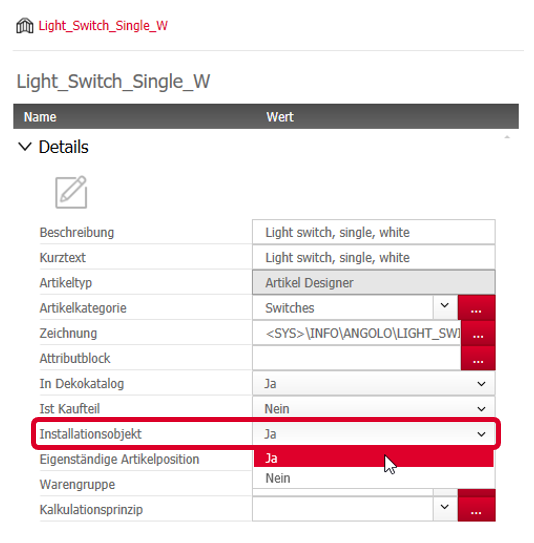
The definition determining if an article is an outlet is determined in the Article Manager under the node “Details”.
If the option Outlet is set to Yes , it can be evaluated via Conditions and thus also be used for annotation principles, among others.
Moreover, it is also possible to visualize and dimension outlets in Views.
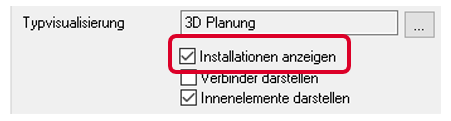
4.2.3.2 Controlling visibility in the Visu Manager
Outlets are created on their own layer in AutoCAD.
However, the Visu Manager controls exclusively their visualization in 3D and in sections in the drawing area as well as their availability for use in the Document Manager.
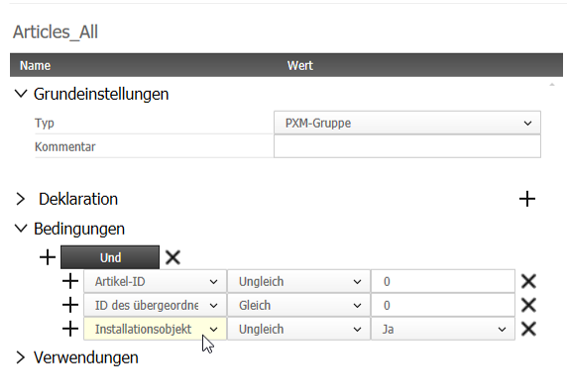
Annotation principle
The Conditions for the type PXM-Group in the Element Manager contain the option “Outlet” which can be set to “Equal”, “Yes” or “No”. In annotation principles, they will be evaluated or ignored according to the condition added.
Outlets with dimensioning
View dimensioning offers the option to dimension outlets as well.
Outlets are dimensioned together with their wall and floor clearances only. The reference point is the insertion point of the DWG saved in the outlet article.
Note: It is possible to dimension outlets even if their visibility is deactivated in the Visu Manager.
Jun 2019 | imos iX 2019
#01130