
iBot for client-specific processing of output batches
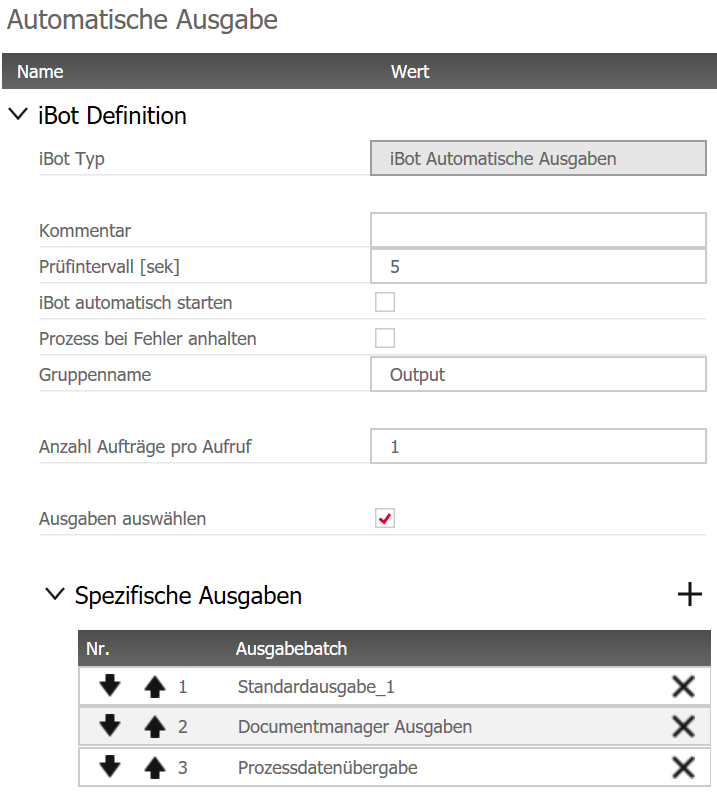
By default, the iBot Automatic output processes all jobs listed in the table CMSOUTPUTJOB. Now, you can assign each job to a different client; in the iBot configuration, simply activate "Output selection" and add the batches of your choice in the "Specific outputs" section. For example, one client workstation may generate the Document Manager outputs while another one generates the process data for the very same order. The output batches are processed in the same order as they are configured in the table in the iBot. If necessary, change the order with the arrows at the beginning of each line to set priorities in the output process; The iBot processes all jobs with priority 1 first. Together with the "Schedule output batch" function, this enables a load distribution and targeted processing of output functions.
Related topics
- The output batch function "Schedule for order separation"
- Automatic separation and creation of production orders
- New principle "Supplier" in the Element Manager
Mar 2021 | Version iX 2019 SR2,
#01382