
iX CAM Edit - modifying NC programs without changing the main data
*iX CAM is not part of the standard installation.
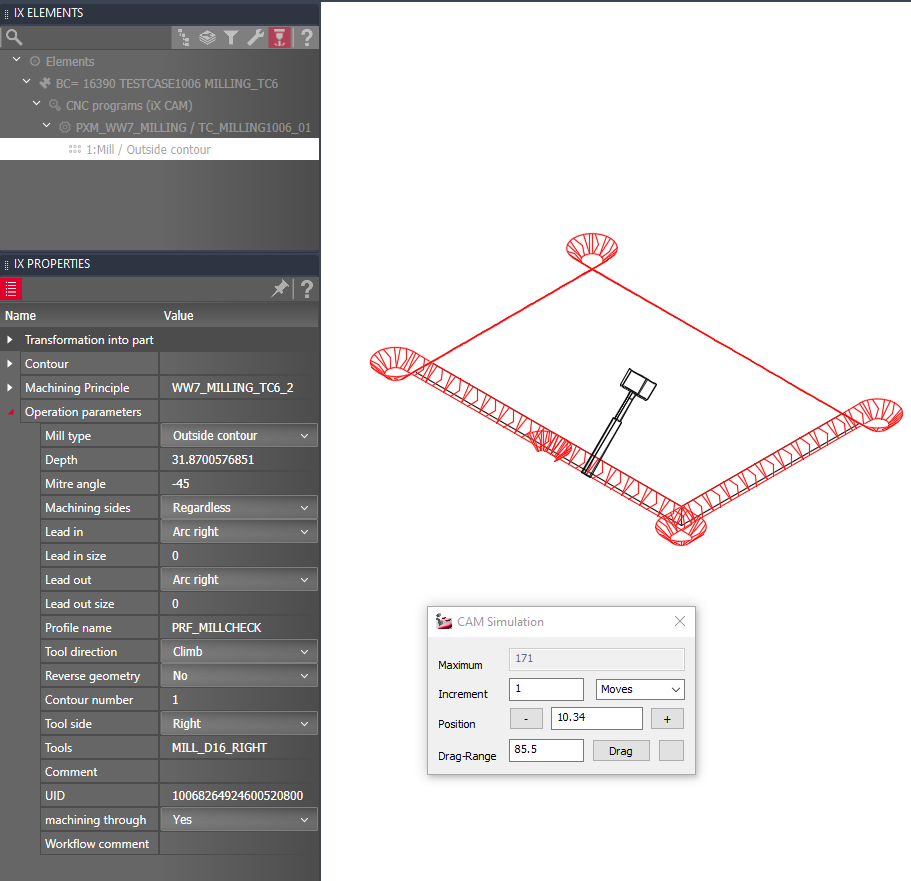
With iX CAM Edit, you can preview and modify each generated program and machining in CAD without modifying your main data. So it enables you to double-check every program and machining at a single workstation before you move to the manufacturing location and adjust the CNC data in detail.
In the tab 'iX CAM Edit' of the iXplorer elements palette, you will find the element tree with all created programs. Via Drag & Drop you can alter a machining sequence within a program. Select a machining in order to view and adjust its program values in the properties palette. The context menu includes options for isolating and visualizing programs and machining as well as a method to finally regenerate CNC data according to your modifications via post processor only.
Hinweis: In order to visualize saw grooves with iX CAM Edit, they must be divided.
Apr 2020 | iX 2019 SR2
#01277