
Increased data security thanks to XML principles in the imos database
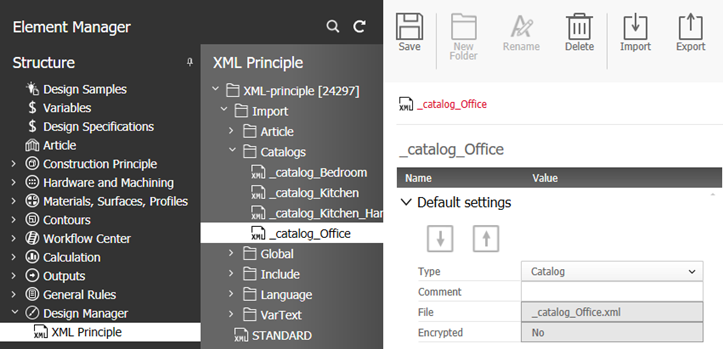
The XML catalog files that you created for use in iX Plan can be managed as XML principles in the Element Manager under the Design Manager node.
The XML principles can be created individually. The desired XML file can be imported or exported for each XML principle.
However, it is simpler and faster to use the mass import/export on offer in the Organizer’s ribbon menu. An identically named XML principle will be created (or an existing file with that name will be overwritten) for each imported XML file.
Notes:
- A main data update via PlanLink also takes XML principles into account.
- The XML files must have different file names.
- The file names of imported XML files may not be more than 50 characters long.
Options
Ribbon
| Option | Description |
|---|---|
|
Save
|
Saves the principle in the database.
|
|
New folder
|
Creates a new folder.
|
|
Rename
|
Rename a selected existing principle.
|
|
Delete
|
Deletes the selected principle.
|
|
Import
|
Import one or more XML files. A principle will be created for each XML file – initially, all imported files will be placed in the folder "Import". After a reimport, XML files and XML principles having identical names will be overwritten. The following properties will be set automatically:
If the feature "encrypt/ decrypt XML" is part of the licence, the XML-data will be encrypted automatically.
|
|
Export
|
Select XML principles or entire folders and click Export, to export the XML files to a directory of your choice.
If the data is encrypted and the necessary licence rights are not present, you are still able to export the data but it will not be readable.
|
Basic settings
| Option | Description |
|---|---|
|
Import
|
Import a XML file into the principle – a click on "Save" saves it in the database.
Note: When you import a new file, even though a file has already been imported, the existing file will be overwritten.
If the feature "encrypt/ decrypt XML" is part of the licence, the XML data will be automatically encrypted. |
| Export |
Export an XML file to read or edit it. Import the file again if you want to save the changes.
|
|
Type
|
The type of the XML file. Possible types:
If imos recognizes the type, the field will be set automatically during import. Else, the type will be set to „Article“. The user can still change the value afterwards. The value in this field is irrelevant when the program reads the file.
|
|
Comment
|
Free text
|
| File | The name of the XML file that has been imported into the principle. |
|
Encrypted
|
States whether the XML file in the database is encrypted or not. The field cannot be edited.
Note: To enable encryption of XML catalog data, please contact a sales or service partner.
|