
Change orientation of the 2D symbol
Question
How can I change the orientation of my 2D symbols?
Answer
imos AG shows by default the 2D symbols for doors always from the hinged side to the opening side.
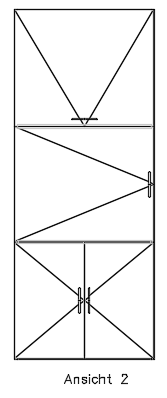
If you want to change that you have to adapt the Graphic.INI in your <Config> directory.
Note:

First copy the original file and then adapt the original file with the text editor as follows:
//DOOR_R: S8 M2,0 L2,3 M2,5 L2,8 M6,8 L6,0 M2,2 L6,2 M2,6 L6,6 M1,4 L2,3 L3,4 L2,5 L1,4
DOOR_R: S2 M0,0 L2,1 L0,2
//DOOR_L: S8 M2,0 L2,8 M6,8 L6,5 M6,3 L6,0 M2,2 L6,2 M2,6 L6,6 M5,4 L6,3 L7,4 L6,5 L5,4
DOOR_L: S2 M2,0 L0,1 L2,2
DOOR_O: S2 M0,0 L1,2 L2,0
DOOR_U: S2 M0,2 L1,0 L2,2
DOOR_2: S2 M0,0 L2,2 M0,2 L2,0
//DOOR_2: S2 M0,1 L1,0 L2,1 L1,2 L0,1 M1,0 L1,2
//DRAWER: S8 M8,0 L7,1 L7,7 L1,7 L1,1 L7,1 M0,0 L1,1 M1,7 L0,8 L8,8 L7,7
DRAWER: S8
GLAS: S8 M2,3 L3,1 M2,4 L3,2 M5,6 L6,4 M5,7 L6,5
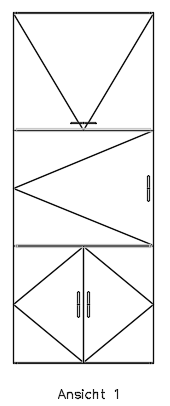
Therefore the symbol is shown rotated:
Note:
If you want to make adjustments, please contact your imos service partner or the imos hotline.We would like to help you to install the files on your system.
These topics could also be interesting for you:
- Filler - Hide 2D symbol
- Display door hinge in elevation view drawing
- Suppress output of 2D symbols for drawers
- Change 2D Symbols for Doors
March 2017 | Version 12SR2
#00689