
Display door hinge in elevation view drawing
Question
How can I display the door hinge in elevation view drawings?
Answer
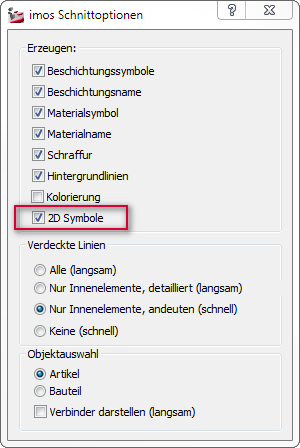
To display the door hinge in an elevation view drawing, the checkbox "2D Symbols" must be ticked in the Section options when generating the view.
Note:

This setting can be also changed later on by clicking the menu function "Refresh View" and ticking the checkbox in the dialog.
These topics could also be interesting for you:
- Filler - Hide 2D symbol
- Suppress output of 2D symbols for drawers
- Change 2D Symbols for Doors
- Change orientation of the 2D symbol
March 2017 | Version 12SR2
#00693