
Order can no longer be modified or saved
Question
1. Why are there orders that I cannot modify?
2. Why are there orders that I cannot save?
Answer
Regarding 1):
You probably are assigned the rights of a "User" or "Main User" while another employee has the right of a "Super Main User" or "Administrator" and saved your order after making changes to it:
Super Main Users and Administrators have the right to modify another user's order.When they save it, they become the owner of the order.The original creator of the order who is a "User" or "Main User" can no longer modify and save it.
Ask the Administrator to make you the owner of the order again.
Regarding 2):
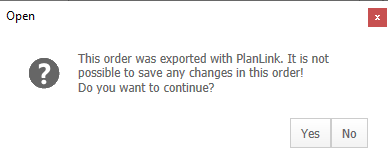
The workaround for resaving and overwriting an existing order that has already been exported via PlanLink is suppressed in Update 14.0.2.25 and later.The predicate is as follows:
By overwriting, ...
- you might alter an order that has already been commissioned.
- the order is rewound to a state where it can be exported again and commissioned by the factory again, too.Reimports on factory-side are already disabled so that changes made to an order by the factory cannot not simply be overwritten/ deleted.
Instead of overwriting the existing order, you can save it as a new order with a similar name.Export the order as you would normally do but inform the factory about the cancellation of the original order.
This could also be interesting for you:
Key words: planning no access my modifications
Jul 2020 | imos iX 2019 SR1 , 14.0.2.25
#01287